

R 教程#
关于添加 lubridate 绑定的 R 教程#
在本教程中,我们将根据指南的快速参考部分以及更详细的首次 PR 步骤部分中指定的步骤,记录向 Arrow R 包贡献绑定的过程。如果此处缺少您可能需要的信息,请随时导航到那里。
该绑定将添加到 R 包的 expression.R 文件中。但是,如果您要添加的绑定位于其他位置,也可以按照这些步骤操作。
本教程与首次 PR 步骤不同,因为我们将处理一个特定案例。本教程并非旨在作为一步一步的指南。
让我们开始吧!
设置#
让我们设置 Arrow 存储库。我们在此假设 Git 已安装。否则,请参阅设置部分。
一旦 Apache Arrow 存储库被 fork(请参阅Fork 存储库),我们将克隆它并将主存储库的链接添加到我们的上游。
$ git clone https://github.com/<your username>/arrow.git
$ cd arrow
$ git remote add upstream https://github.com/apache/arrow
构建 R 包#
构建 R 包的步骤因您使用的操作系统而异。因此,本教程中我们只会提及构建过程的说明。
问题#
在本教程中,我们将解决一个问题,即为 mday() 函数实现一个简单的绑定,该绑定将与 lubridate 中现有的 R 函数匹配。
注意
如果您没有问题并且需要帮助寻找问题,请参阅指南的寻找好的初级问题 🔎部分。
一旦您选择并分配了一个问题给自己,就可以进入下一步。
开始在新分支上工作#
在开始添加绑定之前,我们应该从更新后的主分支创建一个新分支。
$ git checkout main
$ git fetch upstream
$ git pull --ff-only upstream main
$ git checkout -b ARROW-14816
现在我们可以开始研究 R 函数和我们想要暴露或连接的 C++ Arrow 计算函数。
检查 lubridate mday() 函数
浏览 lubridate 文档,我们可以看到 mday() 接受一个日期对象并返回月份中的日期作为数值对象。
我们可以在 R 控制台中运行一些示例来帮助我们更好地理解该函数。
> library(lubridate)
> mday(as.Date("2000-12-31"))
[1] 31
> mday(ymd(080306))
[1] 6
检查 Arrow C++ day() 函数
从计算函数文档中,我们可以看到 day 是一个一元函数,这意味着它接受单个数据输入。数据输入必须是 Temporal class,并且返回值为 Integer/numeric 类型。
Temporal class 指定为:日期类型(Date32、Date64)、时间类型(Time32、Time64)、时间戳、持续时间、间隔。
我们可以使用 call_function 从 R 控制台调用 Arrow C++ 函数来查看其工作原理
> call_function("day", Scalar$create(lubridate::ymd("2000-12-31")))
Scalar
31
我们可以看到 lubridate 和 Arrow 函数在等效数据类型上操作并返回等效数据类型。lubridate 的 mday() 函数没有额外的参数,并且 Arrow C++ 函数 day() 也没有相关的选项类。
查看 expressions.R 中的代码,我们可以看到 day 函数已在 R 包中指定/映射:apache/arrow
我们只需要将 mday() 添加到表达式列表中,将其连接到 C++ day 函数。
# second is defined in dplyr-functions.R
# wday is defined in dplyr-functions.R
"mday" = "day",
"yday" = "day_of_year",
"year" = "year",
添加测试#
现在我们需要添加一个测试,检查一切是否正常。如果存在其他选项或边缘情况,我们需要添加更多。查看类似函数的测试(例如 yday() 或 day()),我们可以看到添加我们拥有的两个测试的好地方是 test-dplyr-funcs-datetime.R
test_that("extract mday from timestamp", {
  compare_dplyr_binding(
    .input %>%
      mutate(x = mday(datetime)) %>%
      collect(),
    test_df
  )
})
并且
test_that("extract mday from date", {
  compare_dplyr_binding(
    .input %>%
      mutate(x = mday(date)) %>%
      collect(),
    test_df
  )
})
现在我们需要看看测试是否通过,或者我们是否需要进行更多研究和代码更正。
devtools::test(filter="datetime")

> devtools::test(filter="datetime")
ℹ Loading arrow
See arrow_info() for available features
ℹ Testing arrow
See arrow_info() for available features
✔ | F W S  OK | Context
✖ | 1     230 | dplyr-funcs-datetime [1.4s]
────────────────────────────────────────────────────────────────────────────────────────────────────────────────────────────────────────
Failure (test-dplyr-funcs-datetime.R:187:3): strftime
``%>%`(...)` did not throw the expected error.
Backtrace:
 1. testthat::expect_error(...) test-dplyr-funcs-datetime.R:187:2
 2. testthat:::expect_condition_matching(...)
────────────────────────────────────────────────────────────────────────────────────────────────────────────────────────────────────────

══ Results ═════════════════════════════════════════════════════════════════════════════════════════════════════════════════════════════
Duration: 1.4 s

[ FAIL 1 | WARN 0 | SKIP 0 | PASS 230 ]
我们收到 strftime 函数的失败,但查看代码发现它与我们的工作无关。我们可以继续,也许可以问问其他人运行测试时是否遇到类似的失败。可能我们只需要重建库。
检查样式#
我们还应该运行代码检查器,以确保代码的样式遵循 tidyverse 样式。为此,我们在 shell 中运行以下命令
$ make style
R -s -e 'setwd(".."); if (requireNamespace("styler")) styler::style_file(setdiff(system("git diff --name-only | grep r/.*R$", intern = TRUE), file.path("r", source("r/.styler_excludes.R")$value)))'
Loading required namespace: styler
Styling  2  files:
 r/R/expression.R                             ✔
 r/tests/testthat/test-dplyr-funcs-datetime.R ℹ
────────────────────────────────────────────
Status   Count Legend
✔  1  File unchanged.
ℹ  1  File changed.
✖  0  Styling threw an error.
────────────────────────────────────────────
Please review the changes carefully!
创建拉取请求#
首先,让我们使用 git status 在 shell 中查看我们的更改,看看哪些文件已被更改,并且只提交我们正在处理的文件。
$ git status
On branch ARROW-14816
Changes not staged for commit:
  (use "git add <file>..." to update what will be committed)
  (use "git restore <file>..." to discard changes in working directory)
   modified:   R/expression.R
   modified:   tests/testthat/test-dplyr-funcs-datetime.R
然后使用 git diff 查看文件中所做的更改,以便发现可能存在的任何错误。
$ git diff
diff --git a/r/R/expression.R b/r/R/expression.R
index 37fc21c25..0e71803ec 100644
--- a/r/R/expression.R
+++ b/r/R/expression.R
@@ -70,6 +70,7 @@
   "quarter" = "quarter",
   # second is defined in dplyr-functions.R
   # wday is defined in dplyr-functions.R
+  "mday" = "day",
   "yday" = "day_of_year",
   "year" = "year",

diff --git a/r/tests/testthat/test-dplyr-funcs-datetime.R b/r/tests/testthat/test-dplyr-funcs-datetime.R
index 359a5403a..228eca56a 100644
--- a/r/tests/testthat/test-dplyr-funcs-datetime.R
+++ b/r/tests/testthat/test-dplyr-funcs-datetime.R
@@ -444,6 +444,15 @@ test_that("extract wday from timestamp", {
   )
 })

+test_that("extract mday from timestamp", {
+  compare_dplyr_binding(
+    .input %>%
+      mutate(x = mday(datetime)) %>%
+      collect(),
+    test_df
+  )
+})
+
 test_that("extract yday from timestamp", {
   compare_dplyr_binding(
     .input %>%
@@ -626,6 +635,15 @@ test_that("extract wday from date", {
   )
 })

+test_that("extract mday from date", {
+  compare_dplyr_binding(
+    .input %>%
+      mutate(x = mday(date)) %>%
+      collect(),
+    test_df
+  )
+})
+
 test_that("extract yday from date", {
   compare_dplyr_binding(
     .input %>%
一切看起来都很好。现在我们可以进行提交(将我们的更改保存到分支历史中)
$ git commit -am "Adding a binding and a test for mday() lubridate"
[ARROW-14816 ed37d3a3b] Adding a binding and a test for mday() lubridate
 2 files changed, 19 insertions(+)
我们可以使用 git log 来检查提交历史
$ git log
commit ed37d3a3b3eef76b696532f10562fea85f809fab (HEAD -> ARROW-14816)
Author: Alenka Frim <frim.alenka@gmail.com>
Date:   Fri Jan 21 09:15:31 2022 +0100

    Adding a binding and a test for mday() lubridate

commit c5358787ee8f7b80f067292f49e5f032854041b9 (upstream/main, upstream/HEAD, main, ARROW-15346, ARROW-10643)
Author: Krisztián Szűcs <szucs.krisztian@gmail.com>
Date:   Thu Jan 20 09:45:59 2022 +0900

    ARROW-15372: [C++][Gandiva] Gandiva now depends on boost/crc.hpp which is missing from the trimmed boost archive

    See build error https://github.com/ursacomputing/crossbow/runs/4871392838?check_suite_focus=true#step:5:11762

    Closes #12190 from kszucs/ARROW-15372

    Authored-by: Krisztián Szűcs <szucs.krisztian@gmail.com>
    Signed-off-by: Sutou Kouhei <kou@clear-code.com>
如果我们很久以前就开始了这个分支,我们可能需要将其 rebase 到上游 main 以确保没有合并冲突
$ git pull upstream main --rebase
现在我们可以将我们的工作推送到 GitHub 上名为 origin 的 fork Arrow 存储库。
$ git push origin ARROW-14816
Enumerating objects: 233, done.
Counting objects: 100% (233/233), done.
Delta compression using up to 8 threads
Compressing objects: 100% (130/130), done.
Writing objects: 100% (151/151), 35.78 KiB | 8.95 MiB/s, done.
Total 151 (delta 129), reused 33 (delta 20), pack-reused 0
remote: Resolving deltas: 100% (129/129), completed with 80 local objects.
remote:
remote: Create a pull request for 'ARROW-14816' on GitHub by visiting:
remote:      https://github.com/AlenkaF/arrow/pull/new/ARROW-14816
remote:
To https://github.com/AlenkaF/arrow.git
 * [new branch]          ARROW-14816 -> ARROW-14816
现在我们必须前往 GitHub 上的 Arrow 存储库创建拉取请求。在 GitHub Arrow 页面(主分支或 fork 分支)上,我们将看到一个黄色通知栏,其中提示我们最近已将更改推送到 ARROW-14816 分支。太好了,现在我们可以通过单击比较并创建拉取请求来创建拉取请求。
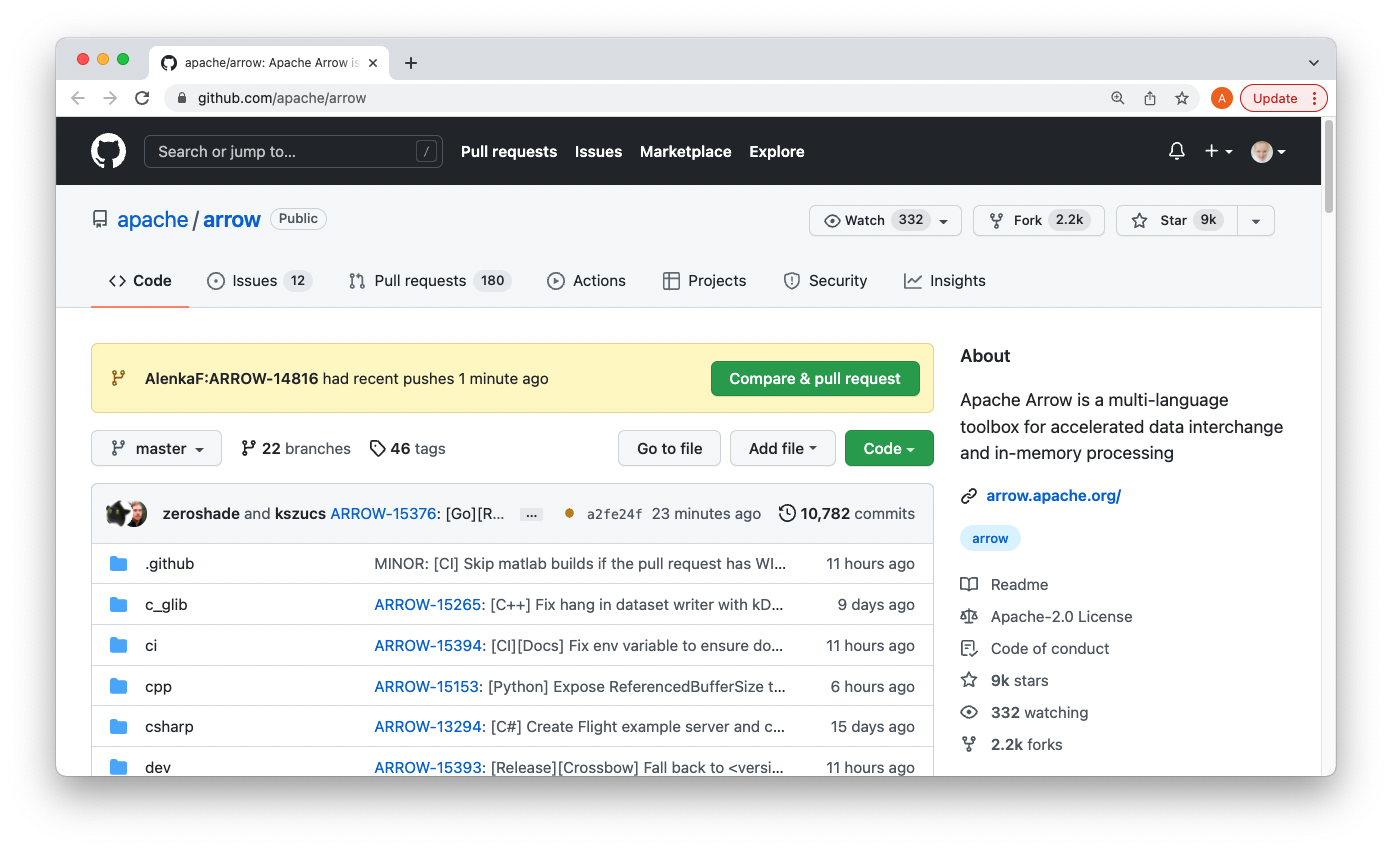
Apache Arrow 存储库上的通知栏。#
首先,我们需要将标题改为 ARROW-14816: [R] Implement bindings for lubridate::mday(),使其与问题匹配。请注意,添加了一个标点符号!
额外说明:本教程创建时,我们使用的是 Jira 问题跟踪器。由于我们目前使用的是 GitHub 问题,因此标题将以 GH-14816: [R] Implement bindings for lubridate::mday() 为前缀。.
我们还将添加一个描述,以便让其他人清楚我们正在尝试做什么。
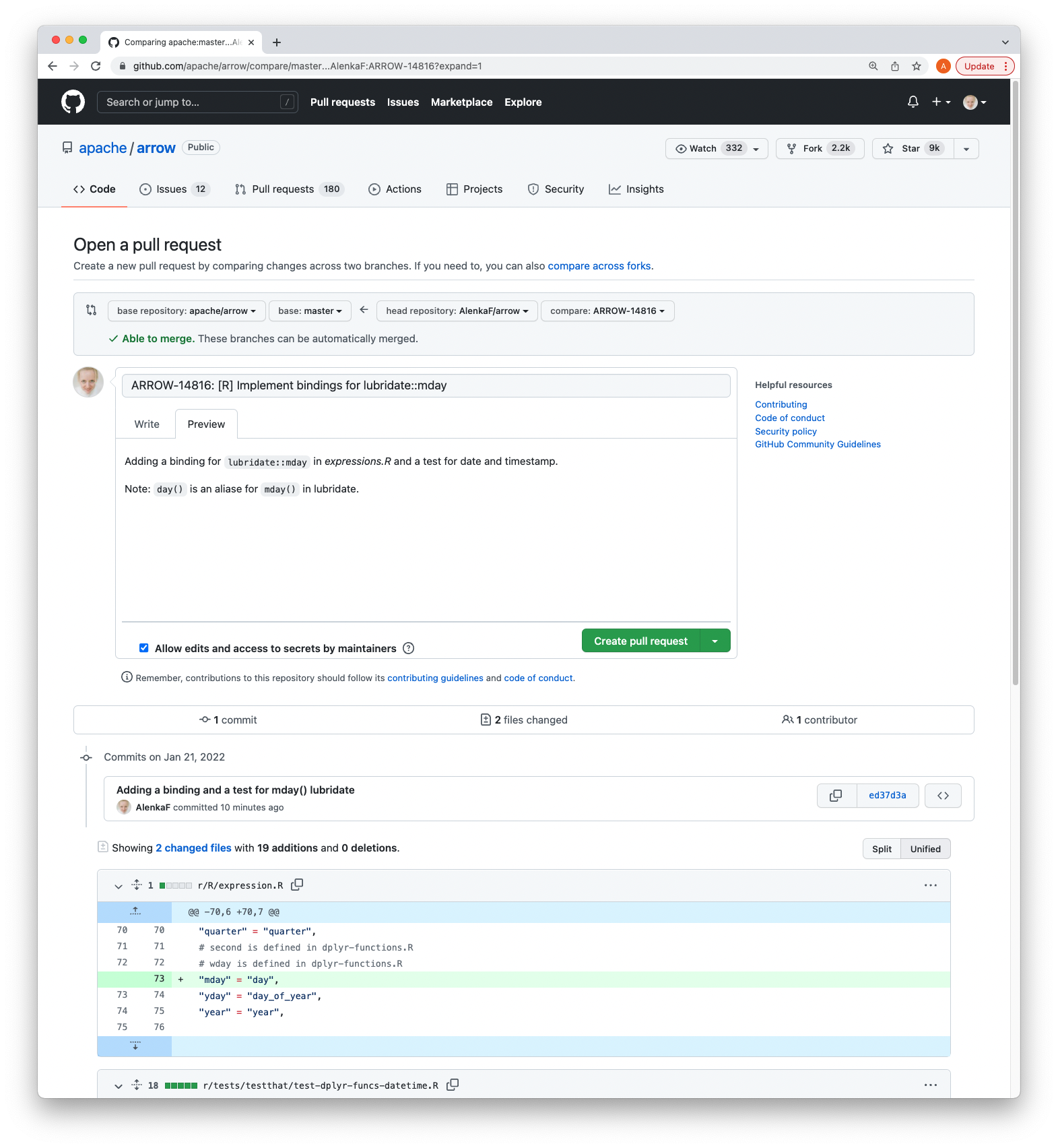
编辑我们拉取请求的标题和描述。#
一旦我们点击创建拉取请求,我们的代码就可以作为 Apache Arrow 存储库中的拉取请求进行审查。
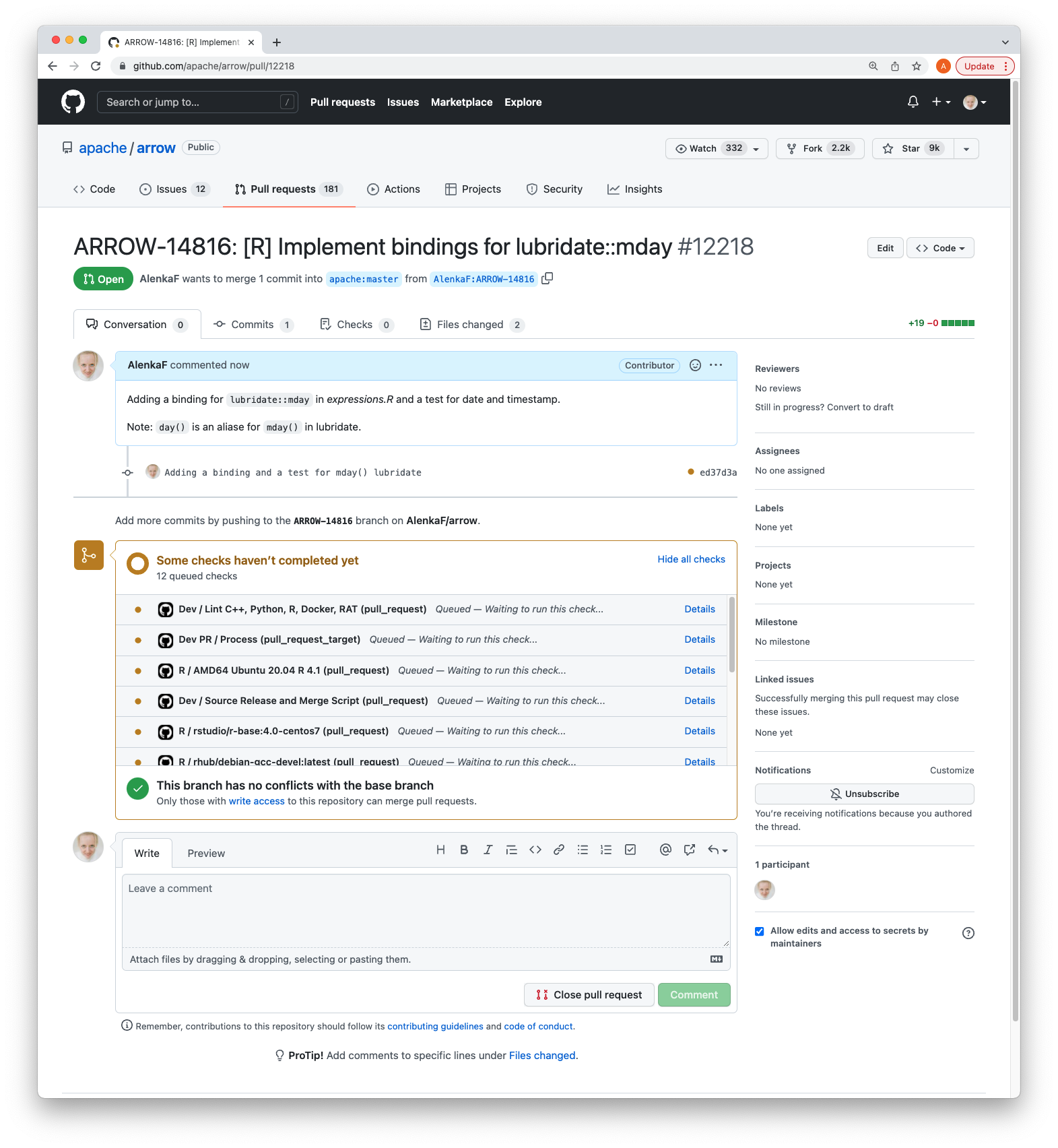
瞧,我们的拉取请求!#
拉取请求与问题关联,CI 正在运行。经过一段时间并收到审查后,我们可以更正代码、评论、解决对话等。
另请参阅
有关拉取请求工作流的更多信息,请参阅拉取请求的生命周期。
我们创建的拉取请求可以在此处查看。